Transfer
Description
This widgets allows the user to transfer files between the PLC and the client system through the HMI.
Usage
This widget requires mapp File (see Automation Studio help GUID f5ac430b-e0ca-4320-bcd0-b7e28a087f77). The libraries MpFile, MpBase and MpServer are required and must be added to project. Make sure that there is a valid mpfilemanager configuration. The image shows a valid sample configuration.
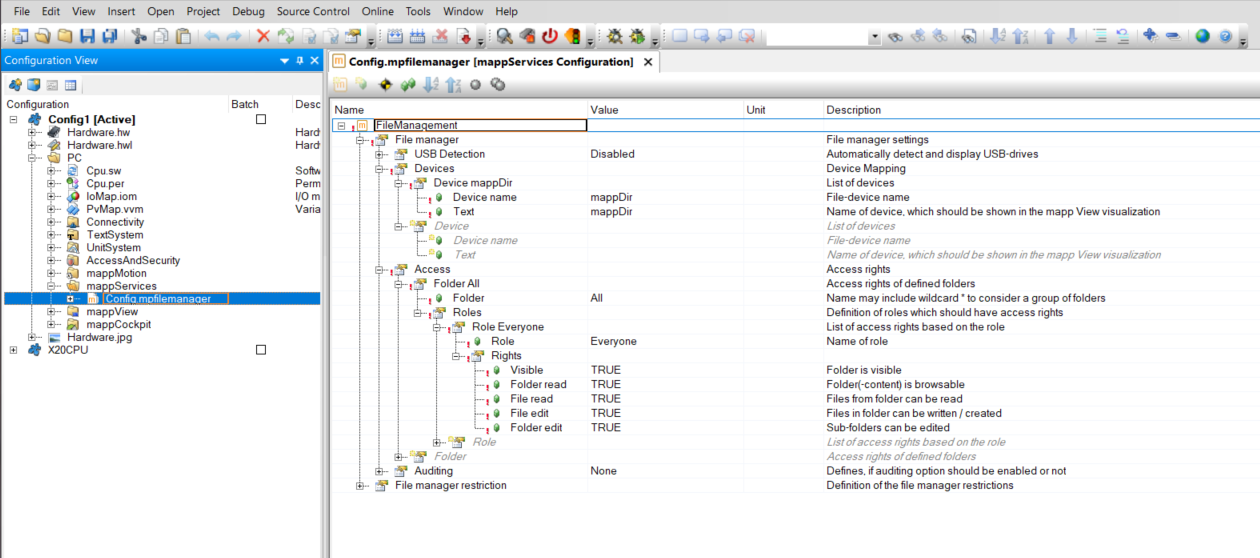
All file devices require a file device configuration. The file device configuration can be found in the target system configuration. With AS6 you can no longer user anonymous token for file devices. You must login with a user that has at least the role BR_Engineer.
Properties
maxFileSize
This is the maximum size of the transferred file. Larger files will generate an error. The maxiumum value may vary on PLC performance and should be between 1.000 - 10.000.000 bytes. Values larger than 10 MB will be rejected.
maxItemNameLength
This is the maximum allowed length of the filename for uploaded files. If the filename exceeds this length, an error is generated and the upload is aborted. The valid range is 1–255 characters. The default value is 50.
Additional Actions
The widget derives all actions from the button widget.
Download This action downloads a file from the PLC to the client.
- filePath - Full path to the file including the device name, filename and extension. Do NOT add 'FileDevice:' before the device name!
Example
mappDir/screenshot.png
mappDir is the device name specified in the target system configuration.
Upload This action uploads a file and saves it on the PLC.
- filePath - Directory where the file should be saved. Do NOT add 'FileDevice:' before the device name!
Example
mappUser/
Additional Events
The widget derives all events from the button widget.
FileSaved
This event is called when the file was saved on the PLC after an upload action. Returns the full path of the file (filePath).
FileDownloaded
This event is called when the file was downloaded successful.
OnError
This event is called when a transfer was not successful. Returns the error number (response). Most error numbers are generated from underlying components and can be found in the Automation Studio help. The widget can also generate the following custom error numbers.
| Error No | Description |
|---|---|
| 10100 | Unknown error. Can occur when the user aborts the transfer |
| 10101 | File size error. The file larger than the parameter maxFileSize |
| 10102 | File parameter error. The value for maxFileSize should be between 1.000 - 10.000.000 bytes |
| 10103 | File name too long. The filename of the uploaded file exceeds the parameter maxItemNameLength |
Requirements
Tested with
- Automation Studio 6.4
- Minimum tested version 5.15
- Expected to work with later version
May also work with lower version: YES
Revision History
Version 5
- Added property maxItemNameLength to limit the length of uploaded filenames
- Fixed error code for unknown errors (10100 instead of 10000)
- Added error code 10103 for filenames exceeding maxItemNameLength
Version 4
- Update to mapp 6.4
Version 3
- Update to mapp 6.3
Version 2
- Fixed upload same file twice does not work
Version 1
- First release