📄Alarm Mapping
Alarm Reactions
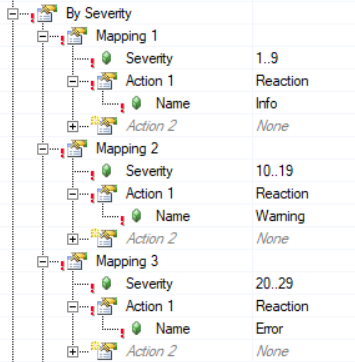
The Framework establishes three alarm reactions by default within the alarm mapping.
- Info (severity 1–9)
- Warning (severity 10–19)
- Error (severity 20–29)
The MpAlarmXCheckReaction() function is called for each reaction within the AlarmMgr task.

Optional Changes
The following optional changes should be considered to align the Framework with the application requirements.
-
Adjust the severity ranges
- This is done in the AlarmXCfg.mpalarmxcore configuration file
-
Rename the reactions
- This is done in the AlarmXCfg.mpalarmxcore configuration file
- If you do this, remember to change the name in the MpAlarmXCheckReaction() function calls in AlarmMgr.st to the new name, starting at line 68
- Examples of alternative reaction names:
-> SlowDownConveyor -> HydraulicMotorOff -> StopAllMotion -> YellowLamp
-
Add or remove reactions
- This is done in the AlarmXCfg.mpalarmxcore configuration file
- If you do this, remember to add or remove function calls of MpAlarmXCheckReaction() in AlarmMgr.st accordingly, starting at line 68
-
Check for the reactions elsewhere in code
- Typically, the MpAlarmXCheckReaction() function is called from other tasks within the application
- For example, the axis control task might check for the Error reaction to determine whether to send a stop command to the axes. Copy and paste the IF statements containing MpAlarmXCheckReaction() from AlarmMgr.st as needed throughout the application